Azure DevOps Network Documentation
Last updated: August 1, 2026
Purpose: This document supports firewall change requests. It gives the network flow specifications for the connection between your Azure DevOps environment and the Aisle SaaS platform.
Firewall rules are necessary for Azure DevOps Server (self-hosted) only. For Azure DevOps Services (cloud), see the section “Azure DevOps Services” at the end of this document.
Summary
Bidirectional traffic is necessary.
Grouped firewall rules can cover more than one Azure DevOps Server.
The rules enable repository analysis, fix pull requests, automatic pull request review (PR bot), and webhook notifications.
Caution: The Aisle egress IP and the Aisle inbound address are two different things. The egress IP is the source of the Aisle-to-server traffic (Rule 1). It is static. Allow it by IP. The inbound webhook destination (Rule 2) is the FQDN {customer}.app.aisle.cloud on port 443. Allow it by FQDN, not by IP. The IP addresses behind that name can change without notice.
Firewall rules
# | Direction | Source | Destination | Port / protocol | Purpose |
|---|---|---|---|---|---|
1 | Inbound | Aisle egress IP | Azure DevOps Server(s) | 443 · HTTPS / TLS | API calls, Git clone / fetch / push |
2 | Outbound | Azure DevOps Server(s) | Aisle tenant URL | 443 · HTTPS / TLS | Service Hooks notifications (push, pull request, comment, repository events) |
Note: Aisle gives you the exact egress IP addresses and your tenant URL {customer}.app.aisle.cloud at onboarding. Programmatic access to the Aisle REST API uses a different endpoint, {customer}.api.aisle.cloud (port 443). The Azure DevOps integration does not need it. If your internal systems will call the Aisle API, request a separate egress rule for that FQDN.
Network flow diagram
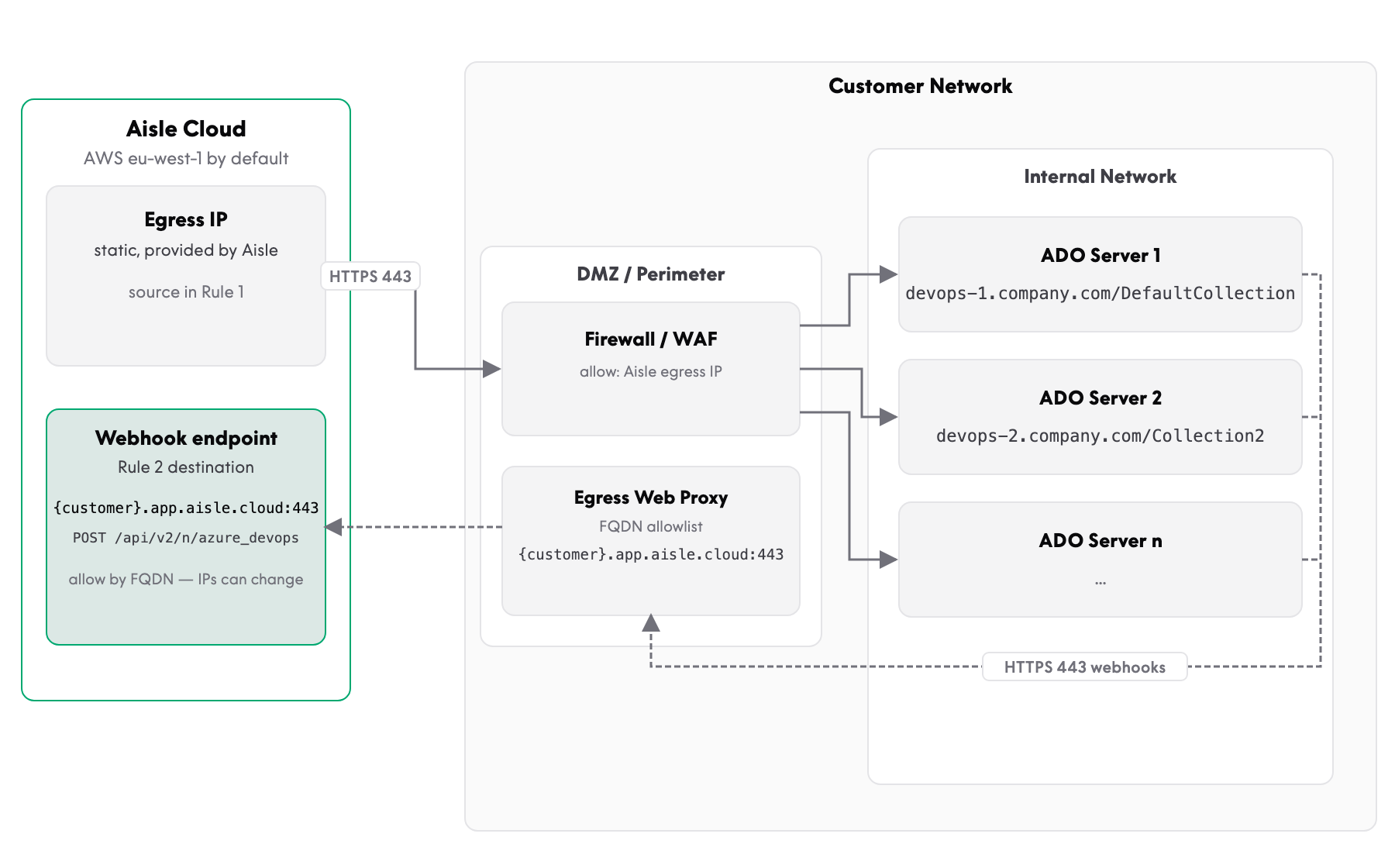
Figure 1 — Network flow. Rule 1 (solid line): Aisle to the server over HTTPS 443 for the REST API and Git. Rule 2 (dashed line): Service Hooks from the server to Aisle through the egress proxy, allowed by FQDN.
Detailed firewall rule specifications
Rule 1 — Aisle to Azure DevOps Server (API and Git operations)
Rule name |
|
|---|---|
Action | ALLOW |
Direction | INBOUND (to the customer network) |
Source IP(s) | <Provided by Aisle> |
Source port | Any (ephemeral) |
Destination | All Azure DevOps Server FQDNs (see the table below) |
Destination port | 443 |
Protocol | TCP / HTTPS / TLS 1.2+ |
Description | Aisle VCS integration — API and Git operations |
More than one Azure DevOps Server (grouped)
If you have more than one server, list all destinations in one rule:
Server name | FQDN | Public IP |
|---|---|---|
ADO-1 |
| example: 203.0.113.10 |
ADO-2 |
| example: 198.51.100.20 |
Note: Enter the public IP that each FQDN resolves to from the internet. This is usually the WAF, the reverse proxy, or the load balancer address, not the internal server address.
Rule 2 — Azure DevOps Server to Aisle (Service Hooks)
Rule name |
|
|---|---|
Action | ALLOW |
Direction | OUTBOUND (from the customer network) |
Source IP(s) | Azure DevOps Server IP(s) |
Source port | Any (ephemeral) |
Destination |
|
Destination port | 443 |
Protocol | TCP / HTTPS / TLS 1.2+ |
Description | Azure DevOps Service Hooks notifications to Aisle |
Azure DevOps endpoints that Aisle uses
Aisle accesses these URL paths on your server. The paths are relative to the collection URL, for example https://devops.company.com/DefaultCollection.
Endpoint | Method | Path | Purpose |
|---|---|---|---|
Connection data | GET |
| Validate the PAT and get the service account identity |
Projects | GET |
| List the projects |
Repositories | GET |
| List the repositories |
Branches | GET |
| List the branches |
Pull requests | GET / POST / PATCH |
| List, make, update, and abandon pull requests |
Pull request threads | GET / POST |
| Read and make comment threads (PR bot) |
Pull request comments | PATCH / DELETE |
| Update and delete PR bot comments |
Comment likes | POST / DELETE |
| Acknowledge PR bot commands |
Commit statuses | POST |
| Post the “Aisle PR Scanner” status on commits |
Pull request statuses | POST |
| Post the status on pull requests |
Merge bases | GET |
| Compare commits |
Diffs | GET |
| Count the changed files |
Service Hooks | GET / POST / PUT / DELETE |
| Control the webhook subscriptions |
Git operations | GET / POST |
| Clone, fetch, and push (Git Smart HTTP) |
Aisle webhook endpoint
Azure DevOps sends the Service Hooks notifications to this Aisle endpoint:
URL |
|
|---|---|
Method | POST |
Content-Type |
|
Authentication | Basic authentication (username and secret password) |
Note: Aisle makes the Service Hooks subscriptions automatically through the Azure DevOps API, with the PAT. Aisle makes and controls the secret. Azure DevOps encrypts the secret at rest.
Events sent
Event | Purpose |
|---|---|
| Keep the repository list in Aisle correct. |
| Start the incremental analysis after a merge. |
| Start the analysis of a new pull request. |
| Start the analysis again after new commits, or when a draft becomes ready, or when a pull request is abandoned. |
| Set the related issue to “resolved” when a fix pull request merges. |
| Permit a manual analysis with an |
Note: The pipeline event for CI validation (ms.vss-pipelines.job-state-changed-event) is available on Azure DevOps Services only. Aisle does not make this subscription on Azure DevOps Server.
Traffic flow sequence
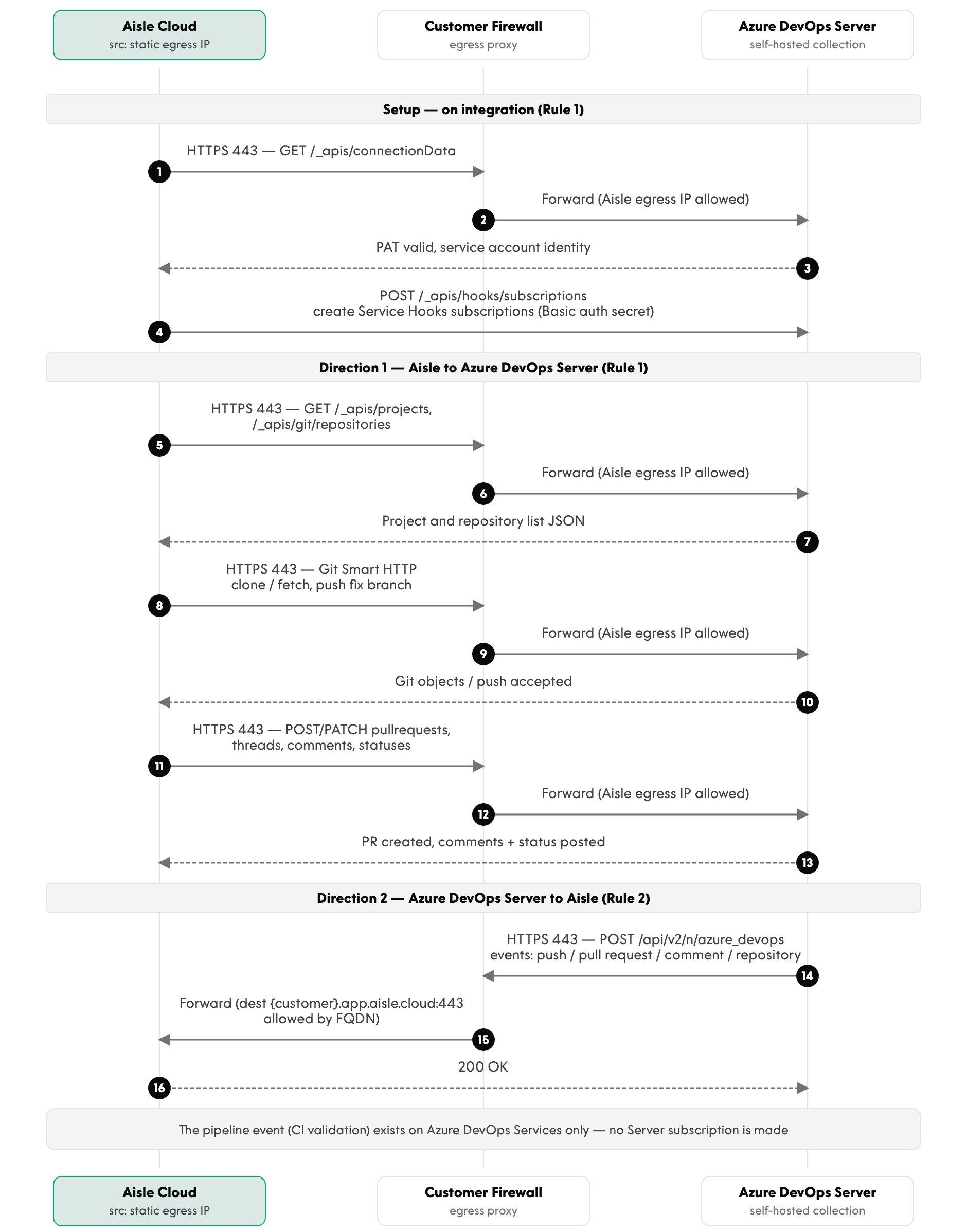
Figure 2 — Traffic flow sequence across Aisle Cloud, the customer firewall or egress proxy, and Azure DevOps Server.
WAF / reverse proxy configuration
If your server is behind a Web Application Firewall (WAF) or a reverse proxy, permit the URL patterns and the HTTP methods that follow.
Permitted URL patterns (inbound to the server)
/_apis/*
/{project}/_git/*
Necessary HTTP methods
Path pattern | Methods |
|---|---|
| GET, POST, PATCH, PUT, DELETE |
| GET, POST (Git Smart HTTP) |
Note: PATCH is necessary for pull request updates and for PR bot comment updates. PUT and DELETE are necessary for the Service Hooks subscriptions.
Possible WAF rule considerations
Rule category | Reason |
|---|---|
Request body size limits | Git push operations can have large payloads |
Rate limits | Repository synchronization can send bursts of requests |
Bot detection | Server-to-server traffic has no browser fingerprint |
(SQL) injection rules | API paths contain ID parameters, and these can trigger a rule |
Outbound WAF / proxy (for the Service Hooks)
Permitted destination |
|
|---|---|
Port | 443 |
Method | POST |
Path |
|
Per-server checklist
For each Azure DevOps Server, make sure that these conditions are true:
The server FQDN resolves from the internet (public DNS).
The TLS certificate is valid and comes from a public CA.
The firewall rule includes this server.
The Public URL in the Azure DevOps Server Administration Console is the same as the collection URL that you register in Aisle. The Service Hooks payloads carry this URL, and Aisle uses it to identify your server. When the two URLs are different, Aisle ignores the events.
Azure DevOps Services
For Azure DevOps Services (cloud), no firewall rules are necessary. Aisle connects to dev.azure.com directly, and Microsoft sends the Service Hooks events to Aisle directly. Your network is not part of these flows.
One exception exists. If your organization turns on the policy Enable IP Conditional Access policy validation on non-interactive flows, and your Microsoft Entra Conditional Access policies use IP restrictions, Azure DevOps also applies the IP restrictions to the Aisle PAT calls. Then add the Aisle egress IP addresses to the permitted locations in Microsoft Entra. For more data, see Conditional Access policies in Azure DevOps.